
Want this set up for your business?
Building a custom Claude agent for sales lead scoring sounds straightforward until you try to make it reliable. Most teams can get a model to label leads. Far fewer can get one to score leads in a way sales reps trust, managers can audit, and RevOps can maintain without babysitting it every week.
A useful lead scoring agent does more than guess intent. It pulls the right context, applies a clear scoring framework, explains the score in plain English, and routes the next step without spraying bad data across your CRM.
Why building a custom Claude agent for sales lead scoring matters
Lead scoring decides who gets attention first. In a busy pipeline, that affects speed to lead, rep focus, and conversion quality. XANT reported that calling a web lead within five minutes made teams 100 times more likely to reach that prospect than waiting 30 minutes later. That stat is about response time, but it points to the same operational problem: if good leads sit in a pile, revenue leaks fast.
A custom Claude workflow can help by summarizing fit, urgency, buying signals, and recommended follow-up from the data you already have. But the model should support human decision-making, not replace it.
Need help turning Claude into a usable sales workflow?
If you want OpenClaw wired into your lead routing, inbox, and CRM without a brittle DIY setup, that is exactly what OpenClaw Ready helps with.
For most B2B teams, the best reader for this kind of setup is a sales leader or RevOps operator with too many inbound leads, inconsistent qualification, and no appetite for another black-box scoring product. They do not need theory. They need a workflow that is explainable and fast.
What the workflow actually needs
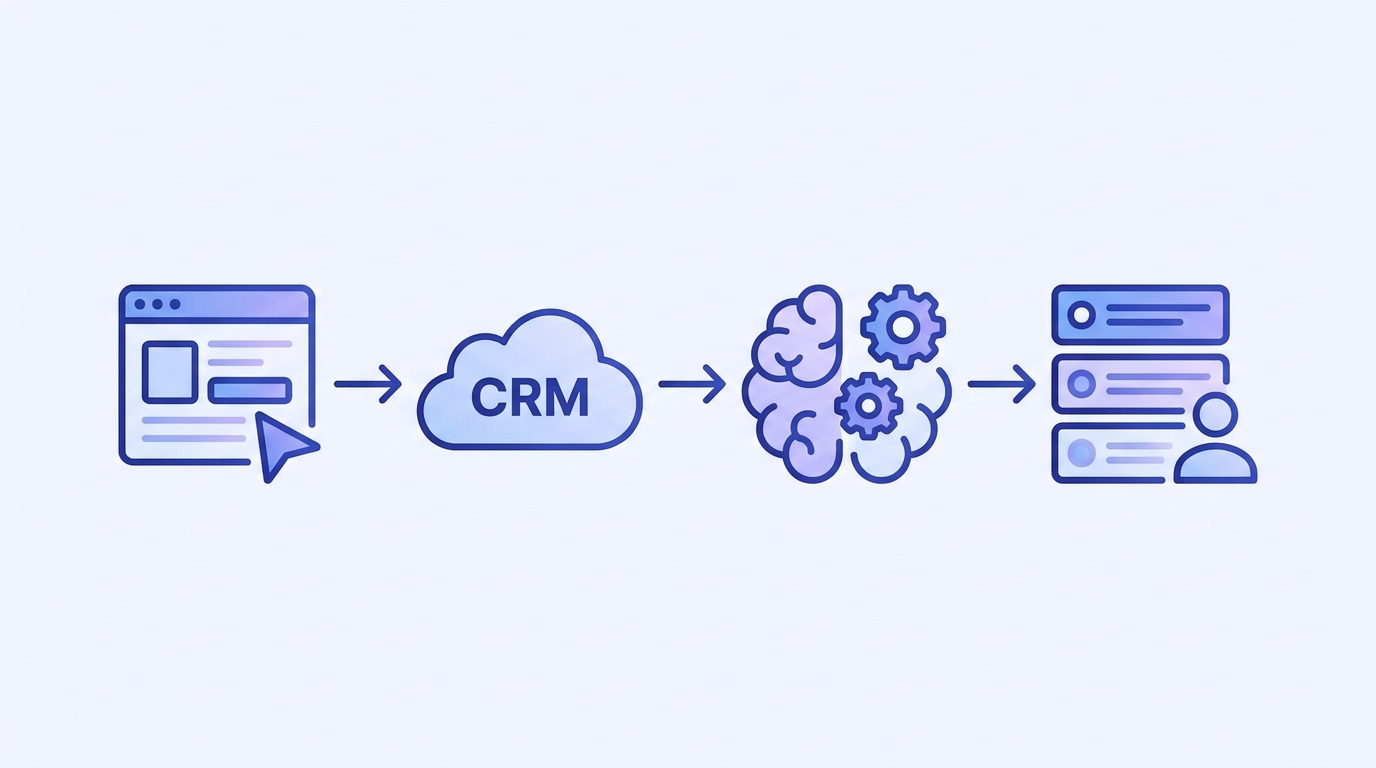
At a minimum, your Claude agent needs structured inputs, scoring logic, and a controlled output format. OpenClaw fits in the middle as the orchestration layer. It can watch the sources, assemble the prompt, call the model, and write the result where it belongs.
A practical version often pulls from form submissions, CRM fields, call notes, inbox activity, calendar bookings, and enrichment tools. If a prospect booked a demo, visited a high-intent page, and matches your ICP by headcount or industry, that should influence the score. So should red flags like student emails, missing company names, or a role that rarely buys.
You can also connect adjacent workflows. For example, if your team already uses OpenClaw to automate email responses, the scoring output can shape reply priority. If meetings are part of the qualification path, the handoff gets cleaner when your ops layer already knows how to manage calendar and inbox workflows.
How building a custom Claude agent for sales lead scoring should work in practice
Start with explicit scoring bands. Keep them boring. Something like 80 to 100 for urgent high-fit leads, 50 to 79 for promising but incomplete leads, and below 50 for weak fit or unclear intent. Each band should trigger a different action.
Then define the prompt around evidence, not vibes. Claude should review specific fields such as company size, job title, inbound source, stated use case, geography, and recent activity. Ask it to output a score, a confidence level, top reasons for the score, missing data, and the next recommended step. Anthropic’s own prompt guidance is consistent on this point: better results come from precise tasks, explicit formats, and clear constraints.
One thing I would not do is let the model write directly into core lifecycle fields with no review. That is where teams create cleanup work for themselves. A safer pattern is to write to custom CRM properties first, then let reps or RevOps approve promotion into primary qualification fields if needed. A simple output contract helps here: score_band=high, fit_score=42/50, intent_score=38/50, confidence=medium, next_action=assign SDR within 15 minutes, reason_codes=demo_request|ICP_match|pricing_page_visit.
Make the score visible where reps already work
The workflow works better when the score, confidence level, and next step show up inside the CRM or task queue instead of a separate dashboard nobody opens.
Common setup mistakes that make the scores useless
The first mistake is feeding Claude messy or contradictory data. If your form says one thing, enrichment says another, and the CRM owner field is stale, the model will still produce an answer. It just will not be one you should trust.
The second mistake is skipping reason codes. A number without an explanation dies fast in sales. Reps need to see why a lead scored high or low. Was it company size, urgency language, a demo request, or a mismatch with the ICP? If the logic stays hidden, adoption drops.
The third mistake is treating every lead source the same. A high-intent demo request should not be scored with the same rules as a top-of-funnel ebook download. Different sources need different expectations, and sometimes different prompts.
The fourth mistake is over-automating the last mile. HubSpot published an example where automated lead routing cut response time from 4.2 hours to 37 minutes and lifted conversion by 23 percent in one quarter. That is a strong result, but routing is not the same as blind scoring. Fast bad routing just gets the wrong rep involved sooner.
Guardrails that keep the model usable
Give Claude strict rules for what it can and cannot infer. If a field is missing, the output should say missing instead of guessing. If the lead does not match your ICP, the explanation should say why. And if confidence is low, the next action might be manual review instead of immediate outreach.
It also helps to separate fit from intent. Fit asks whether the account belongs in your market. Intent asks whether the person appears ready to talk. Those are related, but not identical. A large company with the wrong contact can still be a weak short-term opportunity. A small but urgent prospect might deserve quick follow-up anyway.
This is where OpenClaw can make the workflow feel operational instead of experimental. It can route low-confidence records for human review, notify reps in Slack or Discord, sync notes back to the CRM, and trigger different plays by segment. If your team already runs OpenClaw for marketing agency workflows, you have probably seen the same pattern: orchestration matters as much as the model.

If the workflow is scoring well but routing badly, fix the handoff next
A clean OpenClaw setup can push the score, explanation, and follow-up trigger into the right queue so sales acts on it fast.
What a strong first version looks like
A strong v1 does not try to score every possible lead perfectly. It handles one pipeline, one ICP, and one or two sources well. That narrower scope makes it easier to compare model output against real sales outcomes and retrain the workflow later.
In practice, a good first version usually does five things:
- pulls structured lead data plus a short activity summary
- scores fit and intent separately before combining them
- writes back a score, confidence level, and short explanation
- routes high-priority leads to a fast follow-up queue
- sends edge cases to manual review instead of guessing
That may sound conservative. It is also the kind of scope that usually survives real production use.
Another practical detail is field hygiene. If you store reason codes, keep them in a controlled list like ICP_match, high_intent_page, competitor_switch_signal, student_or_job_seeker, or missing_budget_context. That makes reporting easier and helps RevOps see whether the model is finding real buying signals or just repeating whatever language showed up in the last campaign batch.
You should also decide what happens after the score lands. Some teams create a task for an SDR, some send an alert to an account owner, and some push a short summary into a Slack channel for fast triage. The right choice depends on your motion, but the trigger should be predictable. Reps stop trusting a model when the handoff changes every week.
How to measure whether the agent is actually helping
Do not judge the system by how smart the prompt looks. Judge it by operational metrics. Track speed to first touch, meeting booking rate, acceptance rate by reps, MQL-to-opportunity conversion, and the share of leads that get manually corrected after the model scores them.
You should also review a sample of records every week. Look for drift. Maybe the model started overweighting job titles. Maybe a new campaign source sends very different leads than your historic data. Maybe reps are ignoring the score because the explanation is too generic. That kind of nuance is normal, and catching it early matters more than obsessing over a perfect prompt on day one.
Building a custom Claude agent for sales lead scoring can absolutely save time. But the best setups do not treat AI as magic. They treat it like a decision-support layer inside a disciplined sales process.
Want this built without weeks of trial and error?
If you want a custom Claude agent for sales lead scoring set up the right way, you can get help with the workflow design, integrations, and rollout.
If you want the workflow to hold up under real sales pressure, keep it explainable, keep the write-backs controlled, and keep a human in the loop where confidence is low. That is usually enough to turn a clever demo into something your team will keep using six months from now.
{“@context”:”https://schema.org”,”@type”:”Article”,”headline”:”Building a Custom Claude Agent for Sales Lead Scoring: A Practical OpenClaw Workflow for B2B Teams”,”author”:{“@type”:”Organization”,”name”:”OpenClaw Ready”},”publisher”:{“@type”:”Organization”,”name”:”OpenClaw Ready”,”logo”:{“@type”:”ImageObject”,”url”:”https://openclawready.com/wp-content/uploads/2025/02/openclaw-ready-logo.png”}},”datePublished”:”2026-04-24T10:17:18+00:00″,”dateModified”:”2026-04-24T10:17:18+00:00″,”mainEntityOfPage”:{“@type”:”WebPage”,”@id”:”https://openclawready.com/blog/building-a-custom-claude-agent-for-sales-lead-scoring/”},”url”:”https://openclawready.com/blog/building-a-custom-claude-agent-for-sales-lead-scoring/”,”description”:”Building a custom Claude agent for sales lead scoring? Here is a practical OpenClaw workflow for routing, review, CRM updates, and safer scoring.”,”image”:”https://openclawready.com/wp-content/uploads/2026/04/featured-sales-lead-scoring.jpg”}