
If you are comparing openclaw vs custom gpt after building your first GPT in ChatGPT, you are asking the right question. They can look similar from a distance, but they do different jobs: a Custom GPT waits for prompts, while OpenClaw can run as an autonomous agent that monitors, schedules, alerts, and acts without you sitting there telling it what to do.
That difference matters more than any feature checklist. If you want better conversations, a Custom GPT may be enough. If you want software that keeps working when you walk away, you are in OpenClaw territory.
What Custom GPTs actually do
Custom GPTs live inside ChatGPT. You give them instructions, upload files or reference knowledge, connect approved actions if needed, and shape how they answer. Then users chat with them to get responses tailored to a niche task or topic.
That is why they are useful for internal knowledge bots, sales scripts, onboarding help, document Q&A, and guided workflows. They are fast to create, easy to test, and good at turning a broad model into something more focused and repeatable.
But the real limitation is simple: they only respond when prompted. A Custom GPT does not wake up at 6 a.m. to review yesterday’s orders. It does not monitor your inbox, inspect logs, or ping your team in Discord because something changed. It waits for a person to start the conversation.
So if your goal is better answers, they are a strong option. If your goal is operational automation, they hit a wall very quickly.
There is also a practical deployment limit worth understanding. A Custom GPT lives inside ChatGPT’s ecosystem. That means it relies on OpenAI’s servers, follows OpenAI’s rate limits, and sits behind a chat interface. If you want your automation to pull data from your own database, interact with an internal API, or run on a specific schedule every morning, the ChatGPT environment creates real friction. You are working against the tool rather than with it.
What OpenClaw does that Custom GPTs cannot
OpenClaw is not just another chatbot wrapper. It runs on your own hardware and can stay active in the background, which changes the whole model from prompted conversation to autonomous execution.
That means it can run cron jobs on a schedule without human input. It can check services, watch for new events, query APIs, send proactive alerts, and trigger next steps automatically. Instead of waiting for a prompt, it can work from rules, schedules, and incoming signals.
It also has practical building blocks for automation. OpenClaw can use skills, memory, and sub-agents, and it can respond across channels like Discord, Telegram, and WhatsApp. More importantly, it can take real action in the environment around it by running shell commands, reading files, calling tools, and orchestrating workflows across systems.
For a small business, that opens a very different set of use cases. Think system monitoring, lead routing, daily report generation, inbox triage, content pipelines, inventory checks, or escalation alerts that fire before a human notices the issue.
The difference shows up most clearly in how each tool handles time. A Custom GPT has no concept of “tomorrow morning” or “every Tuesday.” It processes the conversation in front of it and stops. OpenClaw can have a task that fires at 7 a.m. every weekday, checks three different data sources, formats a summary, and sends it to a Telegram channel. No human needs to be involved. That is a genuinely different capability, not just a feature difference.
If you want a broader comparison with other autonomous agent tools, see this guide on comparing OpenClaw to other AI agents.
Want to see what OpenClaw can actually do?
We set it up for you and show you real automations running on day one.
Openclaw vs custom gpt – the real decision criteria
Most people do not need a philosophical debate here. They need a buying decision. So here are the four criteria that actually matter in an openclaw vs custom gpt comparison.
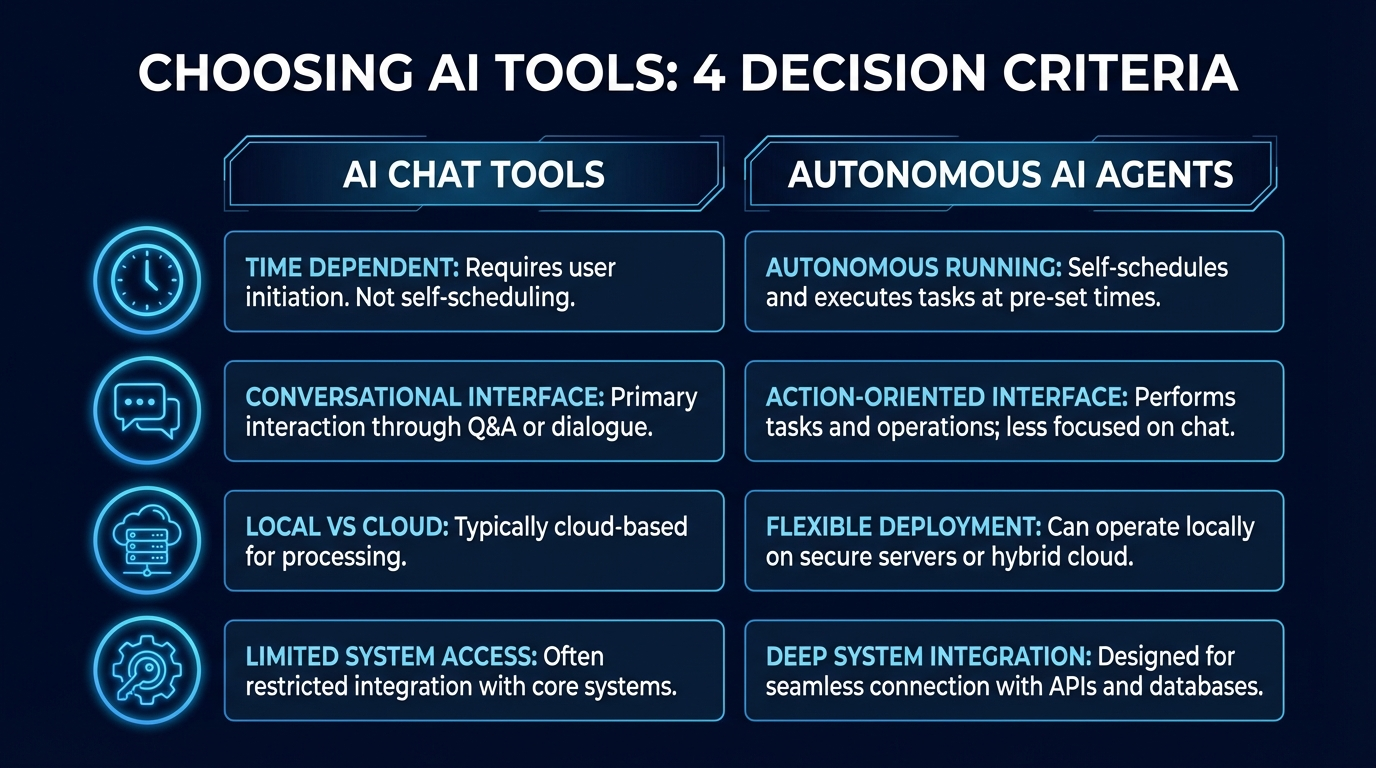
1. Does it need to run without you watching?
If the answer is yes, OpenClaw is the better fit. A scheduled agent that checks data, reacts to changes, and sends alerts has a job to do even when nobody is at the keyboard.
2. Is this a conversational task or an operational task?
Custom GPTs are better for conversations. They shine when a person wants help with questions, summaries, drafting, explanations, or structured back-and-forth. OpenClaw is better for operational tasks where software must observe, decide, and execute steps across systems.
3. Where does it live?
Custom GPTs live inside ChatGPT on OpenAI’s platform. OpenClaw runs on your own machine or server. For some businesses, that local control matters because the agent is closer to your files, scripts, processes, and internal tooling.
4. What system access does it need?
Custom GPTs are limited by the ChatGPT environment and whatever approved actions you wire in. OpenClaw can reach much deeper because it can run commands, call APIs, inspect local resources, and keep state over time. That is powerful, but it also means setup and permissions need more care.
And here is the honest version: Custom GPTs win when the job is mostly conversational. OpenClaw wins when the job is automation. There is some gray area in the middle, especially if your workflow starts as chat but later needs scheduled follow-up, and that is where many teams realize they have outgrown a GPT alone.
If you want examples beyond this comparison, this breakdown of what OpenClaw is used for makes the operational side easier to picture.
Not sure which path is right for your business?
We help you figure out the right setup – no guesswork required.
When both tools make sense
This is where people get tripped up. They assume openclaw vs custom gpt means one winner and one loser. But in a real business, both can make sense because they solve different problems.
A Custom GPT can handle customer-facing Q&A, internal training questions, proposal drafting, or fast document analysis. It is great when a human wants a smart front end for information and ideas.
OpenClaw can handle the back-office layer behind that. It can watch an inbox, push updates into other systems, send team alerts, run scheduled checks, and keep repetitive workflows moving. So one tool helps humans think and communicate, while the other helps operations keep running.
Here is a real pattern worth knowing: many teams start with a Custom GPT and hit its ceiling within a few months. The GPT answers questions well, but nobody set up a trigger to notify the team when something actually needs attention. That is the gap that autonomous agents fill. A scheduled job that runs nightly to check something and sends a report in the morning is genuinely different from a chat tool you have to remember to open.
None of this means Custom GPTs are weak. They are genuinely useful for specific jobs. The question is whether your business needs a conversational tool, an operational one, or both running side by side.
For some companies, the cleanest setup is both. The GPT becomes the conversational interface. OpenClaw becomes the autonomous worker in the background. If you also want the ChatGPT angle spelled out more directly, this article on OpenClaw vs ChatGPT for business automation is the right next read.
The setup reality
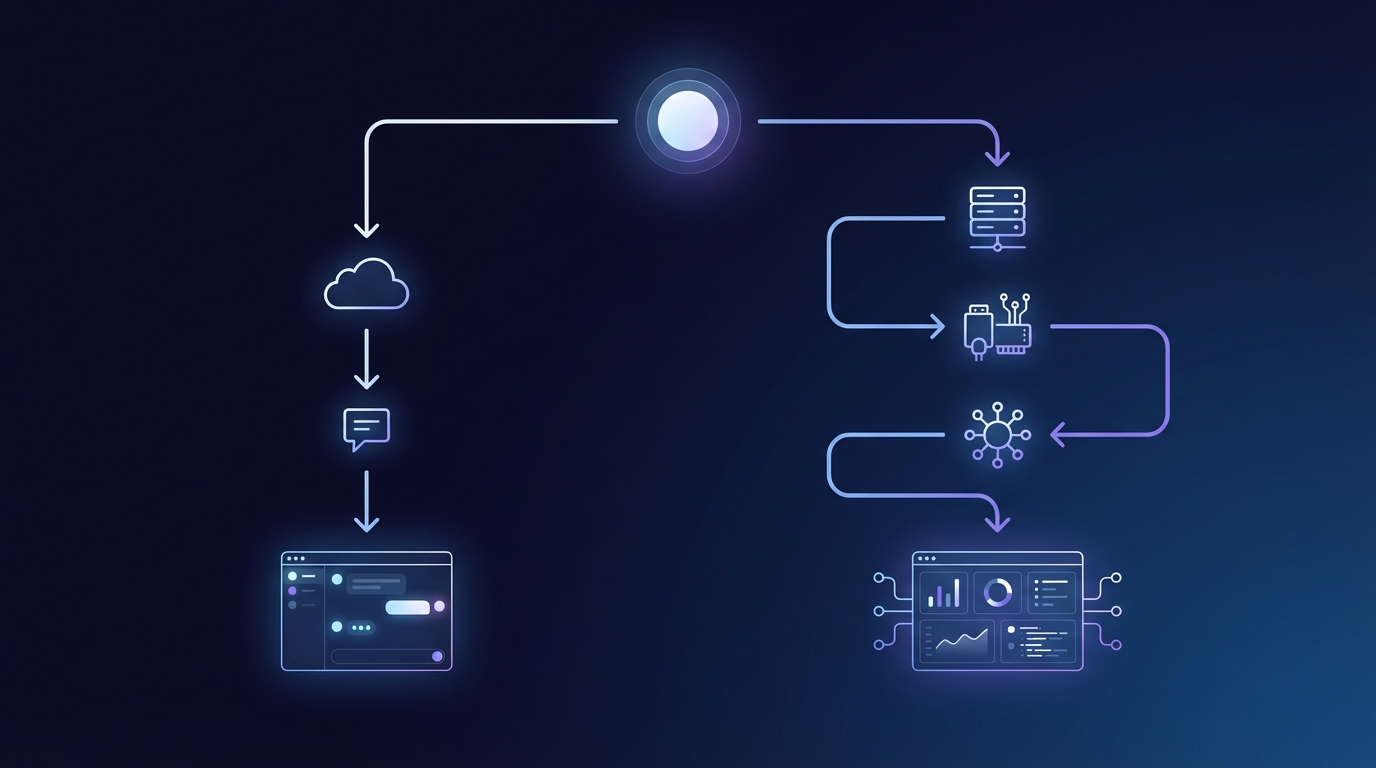
Custom GPTs are easier to start with. You can build one inside ChatGPT in minutes, load instructions, test prompts, and get something useful fast. There is basically no infrastructure burden for the average user.
OpenClaw has a bigger setup curve because it runs on your own hardware and interacts with real systems. That means installation, permissions, skills, channels, and automation design all need to be done properly. But that extra setup is also why it can do work a Custom GPT simply cannot do.
And that is the honest tradeoff. If you just need a smarter chat tool, OpenClaw may be too much. But if you need software that acts on schedules, monitors the business, and takes action without waiting for a prompt, the setup is what delivers real value.
That gap is exactly what OpenClawReady helps close. Instead of figuring out the platform from scratch, you get a setup built around real use cases and a clearer path from idea to working automation.
Ready to move beyond prompted AI?
Our team handles the OpenClaw setup so you can focus on what you do best.
So the short version is this: Custom GPTs are prompted conversational tools, and OpenClaw is an autonomous agent platform. Different tools, different jobs.
If you want true autonomy in the form of scheduled tasks, proactive alerts, and action-taking workflows, OpenClaw is built for that. And if you want help setting it up the right way, OpenClawReady is there when you are ready. The platform is genuinely powerful once it is configured correctly, and that configuration work is something most teams find easier to hand off than to figure out solo.